ChatGPT Ads in Europe: the setup guide, screen by screen
In 60 words: since 31 August 2026, a European business can open a ChatGPT Ads account on its own. Here is the full setup, field by field, recorded in a real account, and the sourced answer to the question everyone asks: does paying change what ChatGPT recommends? No. OpenAI documents it, and a 50,006-prompt study measures it. Ads complement organic visibility, they do not buy it.
Written by Kamil Kaderbay, published 3 September 2026. Method: opening a real European advertiser account, creating a measurement data source, and walking the entire campaign wizard, screen by screen. The account runs in French, so field labels below are translated and exact English strings may differ slightly; character limits, formats and behaviours are language-independent. No campaign was published, which the final section covers.
Availability, as of 3 September 2026
| Item | Status |
|---|---|
| Ads serving in Europe | Live since 24 August 2026, across 31 markets |
| Who sees ads | Free and Go plans only. Plus, Pro and Enterprise stay ad-free |
| Opening an advertiser account | Self-serve since 31 August 2026 |
| Restriction | Beta, limited to approved categories whose creatives clear ad policy review |
| Other routes | OpenAI Ads Solutions team, agency partners, technology partners |
The source is OpenAI’s 18 August announcement, whose 31 August update states that self-service access through Ads Manager is now available across the 31 European markets.
Read this first: the wizard keeps nothing
This governs the whole working order, and it is written nowhere.
We filled in the complete creation wizard: campaign, ad group, two ads. Coming back to the account, the list read “Create your first campaign”. The audit log, under Tools > Change history, held exactly two entries: the ad account creation and the data source creation. No campaign object had ever existed.
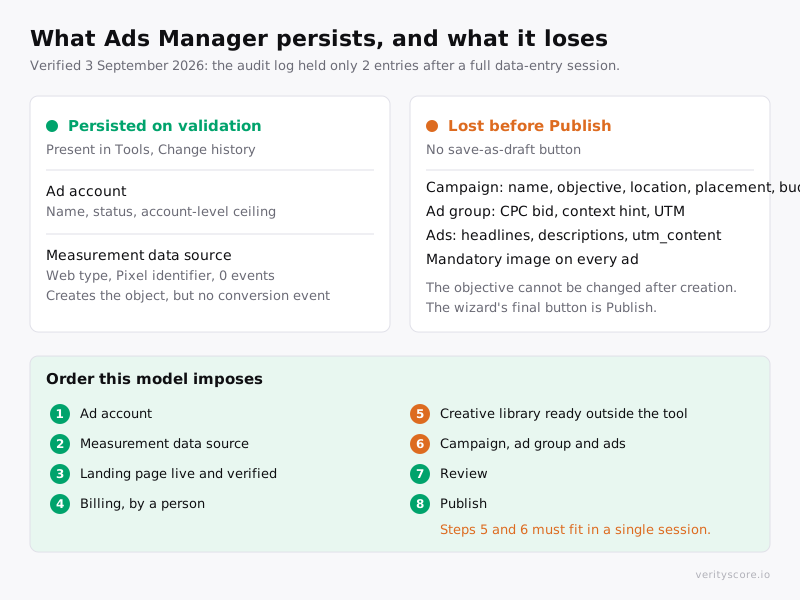
Figure 1. The ad account and the data source survive as soon as their form is validated. Everything entered in the campaign wizard disappears until the Publish button has been used.
There is no “save as draft”. The only button that writes anything is Publish, and publishing commits spend.
What this does to your plan: billing and measurement source first, copy and image prepared outside the tool, then a single session for the campaign. The rest of this guide follows that order.
Step 1: create the measurement data source
Exact path: Tools > Conversions > Data source > Create
Settings: a free-text name, and type Web. Creation asks you to accept the conversion terms and creates an object that does persist.
Expected result immediately after: the source appears with 0 events and 0 %, and three warnings fire. They are normal at this stage and signal no defect:
| Warning | Scope | Why it is normal |
|---|---|---|
| No active campaign uses conversion events | Account | No campaign exists yet |
| No recent server-to-server events | Account | The Conversions API is not wired |
| No recent conversion events | Data source | The Pixel is not deployed |
Watch a common confusion: creating the source does not create a conversion event. The setup panel lists four steps and ticks only one. Creating the event, logging it and attaching it to a campaign are still ahead of you.
Step 2: configure billing
Path: Billing, or the “Finish setup” link in the yellow banner.
Until this is done, the interface permanently shows that ads cannot be delivered while account setup is incomplete, and that billing must be configured before ads can run.
Do it before building the campaign. Otherwise you will enter a campaign you cannot publish, and it will vanish.
Step 3: the campaign wizard, screen by screen
Path: Campaigns > Create a campaign. A menu offers two entries: creating a single campaign, or a bulk import.
The wizard opens in a “New campaign” window with three steps in the left column: create the campaign, create the ad group and the ads, then review, which holds the campaign summary.
The entry trap: a campaign the AI already wrote
The wizard does not open on an empty form. It opens on a campaign summary carrying an “AI generated” badge, with a campaign, an ad group and an ad already filled in from your site.
In our case, for a campaign targeting France, the generated headline came out in English and the image had been pulled automatically from the site. A “Create from scratch” button, top right, switches to a manual form. Use it if you want to control what you are buying.
Defaults worth examining one by one
Recorded 3 September 2026 on a European account:
| Field | Default | What to know |
|---|---|---|
| Campaign name | Derived from the account name | Rename to your convention |
| Campaign type | Standard | Only value observed |
| Objective | Clicks | Cannot be changed after creation |
| Target locations | Inferred from the account | |
| Eligible platforms | iOS app, Android app, Web (Desktop), Web (iOS), Web (Android) | Five platforms ticked together. If your destination is a web page, the two app entries make no sense |
| Average daily budget | €65.00 | This is a daily budget, not a total. Entering 10 on a total-budget field triggers a validation asking for at least 65 |
| Text personalization | On | See below, the most important switch on this screen |
| Company logo | The domain favicon | Editable |
The setting to turn off first
Text personalization is on by default. The interface help text is explicit: AI automatically generates personalized and translated versions of your ad headlines and descriptions, which may be shown without review or approval on your part.
In other words, variants of your ads can run without you ever reading them. For a brand that cares about its wording, or a sector where a shade of vocabulary carries legal weight, this is the first switch to flip.
The ad group screen
| Field | Content |
|---|---|
| Ad group name | Defaults to “Ad group 1” |
| Website URL | Pre-filled with the account domain |
| Bid strategy | Defaults to maximizing results |
| Context hints (optional) | Empty by default |
Context hints are not keywords and guarantee no delivery: they describe the conversations where your offer is relevant. Write them from the concrete problem your customer voices, not from a generic category like “ecommerce”.
On bidding, the official documentation recommends starting between 3 and 5 USD per click on a click campaign. That is a starting indication in dollars, not a forecast of average cost.
The ad screen, and its exact limits
This is where the constraints the public documentation does not give live.
| Field | Recorded limit | Interface message |
|---|---|---|
| Headline | 50 characters | Text may be truncated depending on placement |
| Description | 3 characters minimum, 100 maximum | Enter a description of at least 3 characters |
| Ad images | PNG or JPG, square, at least 256 × 256 px | Upload a PNG or JPG. For best quality use a square image, at least 256 × 256 px |
The truncation warning on the headline deserves attention: at 50 characters you are already at the ceiling, and the placement can cut before that. Put the decisive information first.
The image is mandatory, even though the area can read as optional. Moving to review otherwise triggers a request to add an image before creating the ad, and the button stays disabled.
URL macros, the most useful and least known part
The landing page query parameters field accepts template variables. Its help text lists them: {campaign_id}, {ad_group_id}, {ad_id}, {ad_account_id} and {oppref}.
Five macros, including {oppref}, OpenAI’s click reference. You can therefore pass it through your own parameters and read it server-side, instead of depending only on the cookie the SDK sets.
An example value for that field:
utm_source=chatgpt&utm_medium=paid&utm_campaign=eu_pilot&utm_content={ad_id}&oai_ref={oppref}The ad preview shows what the user will see: your logo, the advertiser name, an “Ad” badge, the headline, the description and the image.
Review
The “Next: Review” button only enables once every ad is complete. A failing ad is flagged with a warning icon in the left column, and a red banner asks you to fix that ad’s problems before moving to review.
At the bottom of the window sits a constant legal note: clicking Publish accepts the advertising tool terms of use.
Does paying change your organic visibility in ChatGPT?
This is the question that sets the budget, and it deserves a sourced answer rather than a hunch.
What OpenAI says, twice
The official ads FAQ, updated early September 2026, answers “Do ads influence the answers ChatGPT gives me?” without nuance: no. Ads run on separate systems from the chat model, and advertisers have no ability to shape, rank, or alter ChatGPT’s responses. It adds that an ad is a paid placement and that seeing one does not mean OpenAI endorses the advertiser.
The pilot announcement from February 2026, updated in March, holds the same line: ChatGPT’s answers remain independent and unbiased.
What that means for a store: you cannot buy a recommendation. And the reverse holds too: not buying ads does not penalize you in the answer.

Figure 2. The answer is generated from the sources ChatGPT reads, including your product pages. The ad, below it, comes from another system, fed by your bid and your context hints. Neither influences the other.
What an independent study measures
SE Ranking analyzed 50,006 commercial prompts across 20 niches, in the United States, in August 2026. The data is American and covers Free and Go users, the only ones who see ads; it describes the mechanism, not any European market.
Three figures to keep:
| Measure | Result | What it changes for you |
|---|---|---|
| Commercial prompts that show an ad | 25.94% | Three commercial conversations in four have only the organic answer |
| Placements where the advertiser is not cited among the answer’s sources | 96.37% | Paying does not get you into the answer |
| Ads unrelated to the prompt | 14.35%, one in seven | Context hints must be precise, or you pay for off-topic placements |
The study also notes that at that date each answer showed a single slot with no competing ad beside it, while flagging that OpenAI is testing multi-advertiser placements. The official FAQ already speaks of “one or more ad units”.
SE Ranking also ran its own campaigns for two weeks: over 97,000 impressions, 1,263 clicks, roughly 1.3% click-through, and “very few sign-ups”. A single case, B2B, in the US. Not a norm, but a reminder that a click is not a conversion.
The one real point of contact with GEO
There is one, and it is technical: an ad’s landing page must not block OAI-SearchBot. That same agent is the one that reads your pages for ChatGPT’s organic citations.
In other words, the one thing preparing a campaign forces you to do on your site, allowing that agent, is also a prerequisite for organic visibility. A store that blocked it out of caution and allows it for its ads becomes, in the same move, readable for answers.
That is the only mechanism where the two touch. It runs through access, not money.
And your Google rankings?
No documented mechanism links a ChatGPT ad to your position on Google. The ad is a paid placement in a third-party interface, not a link in indexable content. It adds nothing to and takes nothing from your organic search visibility, in either direction.
What can play indirectly is traffic: visitors who arrive, stay and buy on a well-built page. But that is true of any paid traffic source, and has nothing specific to ChatGPT.
Product feed ads: paid only
Since June 2026, Ads Manager accepts a Google Shopping-compatible product feed and generates ads from the catalog. The official documentation is explicit about the boundary: products from your feed are only eligible for ads during this beta, they will not appear in organic ChatGPT conversations, though OpenAI says it may offer that capability later.
Sending your catalog to Ads Manager therefore does not make it organically visible. What makes your products readable in answers is still what ChatGPT reads on your pages and in your structured data, and that can be worked on without spending a euro.
For a merchant weighing that format: OpenAI states that feed-based ads have been among the strongest performers in its program, and cites in an email to advertisers one DTC brand said to have doubled its click-through rate and halved its CPC after moving to feed ads. That is the platform’s claim about a single case, not an independent measurement. A useful detail: after delivery begins, allow up to seven hours for product reporting to appear.
What to conclude for a budget
Three commercial prompts in four show no ad at all. In the remaining quarter, the advertiser almost never enters the answer. And the catalog sent for ads does not feed organic results.
ChatGPT ads are therefore a complement to organic visibility, not a substitute. If your product pages are unreadable to ChatGPT, a campaign buys clicks to a page the model still will not recommend. The order stays: make the product readable first, buy traffic second.
Trap 2: the privacy control you expect to disable
The measurement Pixel ships a feature called automatic advanced matching. It detects supported customer information from recognizable forms on a page, normalizes it, and hashes it with SHA-256 in the browser before including it with conversion events.
An earlier version of the documentation described a path to turn it off. That path is no longer in the current text, and the corresponding dialog exposes no checkbox or switch. The Conversion Measurement page now presents it as Pixel behaviour, stating that you do not need to change your Pixel implementation.
The legal trap. If your privacy policy promises to disable and verify this feature, you are publicly promising a control the provider does not give you. That is worse than promising nothing, because it is checkable and false.
What stays under your control is the Pixel’s scope. The feature reads forms: a page with no input fields gives it nothing to detect. Loading the Pixel only on a form-free landing page is a defensible mitigation, and a verifiable one rather than a declared one.
Do not confuse this with {opt_out: true}, which limits later user-level personalization for a given event. It is not a way to disable automatic advanced matching.
Trap 3: your landing page can be disqualified
The Create Ads documentation sets a condition that is easy to miss: the landing page must not block OAI-AdsBot and OAI-SearchBot.
Plenty of stores block AI crawlers by default, out of caution or through a firewall rule. If OAI-AdsBot gets a 403, you are buying clicks to a destination the platform cannot validate.
curl -s -o /dev/null -w "%{http_code}\n" -A "OAI-AdsBot/1.0" https://your-store.com/the-page-you-bought/A 200 is what you want. Also confirm your robots.txt names both agents explicitly, and that the exact URL you will buy, parameters included, returns 200 without a redirect. This connects to a wider question: knowing whether your AI crawlers are blocked has become a delivery prerequisite.
What the measurement does, and does not do
The click reference. OpenAI appends an oppref parameter to the landing page URL. The Pixel SDK captures it and stores it in a first-party cookie. Strip URL parameters aggressively and you remove that path. The {oppref} macro above lets you recover it another way.
Available events. The official taxonomy covers page_viewed, contents_viewed, items_added, checkout_started, order_created, lead_created and others. But app_installed and app_opened are Conversions API only, require action_source=mobile_app, and are not supported by the JavaScript Pixel.
Reporting gaps. OpenAI documents that its figures can differ from your analytics provider’s: attribution methods and windows, timestamps and time zones, browser, consent and storage conditions, deduplication, modelled conversions. A difference is not necessarily an error.
The European rollout also started without personalization. We observed in the interface that custom audiences are not supported in the EEA and Switzerland.
The checklist before spending the first euro
- Confirm your business falls in an approved category.
- Put the landing page live and test it: 200,
OAI-AdsBotandOAI-SearchBotat 200, full URL with parameters at 200 without redirect. - Check it on mobile, consent banner included. A banner fixed to the bottom of the screen can cover your only conversion button at first paint.
- Create the measurement data source.
- Decide what your privacy policy commits to.
- Set up billing.
- Prepare outside the tool: headlines of 50 characters maximum, descriptions of 100 maximum, a square PNG or JPG of at least 256 × 256 px, and the value for the query parameters field.
- Build the campaign in a single session, turning off text personalization and unticking the platforms that do not match your destination.
Steps 1 to 7 can be spread out. Step 8 has to happen in one go.
What we cannot tell you yet
At the time of writing, we have not clicked Publish. Everything after that click is documentary.
We do not know whether a creative review exists, how long it takes, or what label it appears under. We do not know the propagation delay for the first conversion event. And we have no performance data, so no observed cost per click to set against the official 3 to 5 USD guidance.
Those gaps will be filled in a dated update, with measurements rather than estimates.
Frequently asked questions
Do ChatGPT ads influence ChatGPT’s answers?
No. OpenAI’s official FAQ states that ads run on separate systems from the model and that advertisers cannot shape, rank or alter responses. An August 2026 SE Ranking study of 50,006 US commercial prompts measures that the advertiser is not cited among the answer’s sources in 96.37% of placements.
Does buying ChatGPT ads improve my organic visibility in ChatGPT?
Not through spend. The only point of contact is technical: the landing page must allow OAI-SearchBot, which is also the agent behind organic citations. Allowing it for your ads makes you readable for answers, but access is what matters, not budget.
Do ChatGPT ads affect my Google rankings?
No documented mechanism. The ad is a paid placement in a third-party interface, not a link in indexable content. It changes nothing about your organic position on Google.
How often does ChatGPT show ads?
According to SE Ranking, across 50,006 US commercial prompts in August 2026, 25.94% showed an ad. Three commercial conversations in four had only the organic answer.
Where do ads appear in ChatGPT?
Below the end of the answer, clearly labeled as sponsored and visually separated. Per the official FAQ, they do not appear in Temporary Chats, nor during this test in the ChatGPT Atlas browser, nor near sensitive topics such as personal health or politics.
What is the difference between ChatGPT Ads and Google Ads?
Targeting: Google Ads starts from keywords, ChatGPT Ads starts from natural-language context hints describing relevant conversations, with no keywords. Placement: below the answer, in a single slot at the date of the SE Ranking study. Intent: conversational and still forming, rather than a query already decided.
Does a product feed sent to Ads Manager make my products organically visible?
No. The official documentation states that feed products are only eligible for ads during the beta and will not appear in organic conversations.
Does OpenAI share conversations with advertisers?
No. Per the official FAQ, advertisers have no access to chats, history or memories, and receive only aggregated data such as views and clicks. SE Ranking confirms from the advertiser side that you cannot see the conversations where your ad appeared.
Can a European business open a ChatGPT Ads account on its own?
Yes, since 31 August 2026, across the 31 European markets. Access remains a beta limited to advertisers in approved categories whose creatives comply with OpenAI’s advertising policies.
What are the character limits for a ChatGPT ad?
Recorded 3 September 2026: the headline is capped at 50 characters, with a warning that text may be truncated depending on placement. The description accepts 3 to 100 characters.
What image format does a ChatGPT ad need?
The interface asks for a PNG or JPG and recommends a square image of at least 256 × 256 pixels. The image is mandatory: without it, moving to review is blocked.
Can you prepare a campaign and finish it later?
No. The wizard offers no draft save and its final button is Publish. Everything entered disappears until the campaign is published, verified in a real account’s audit log.
Can you track the OpenAI click in your own URL parameters?
Yes. The landing page query parameters field accepts the macros {campaign_id}, {ad_group_id}, {ad_id}, {ad_account_id} and {oppref}.
Should you turn off text personalization?
It is a choice, but a conscious one. On by default, it allows automatic generation and translation of your headlines and descriptions, shown without review or approval on your part according to the interface text.
Can you disable the Pixel’s automatic advanced matching?
Not from the advertiser side. Current documentation describes it as automatic Pixel behaviour. The workable mitigation is to load the Pixel only on a page with no input fields.
Selling on Shopify and preparing this channel? The first euro is decided by the quality of the landing page, not by the bid. Audit for free what AI actually reads in your product pages before you buy your first click.