The problem in 60 words
Blocked AI crawlers are far rarer than the internet suggests. We measured 432 French Shopify stores: exactly one blocks an AI search crawler or a shopping agent. Shopify ships a permissive robots.txt by default, and it takes a manual change to break it. So this procedure serves one purpose: confirming in 15 minutes that you are not the exception, and covering non-Shopify sites sitting behind a CDN.
What we measured
On July 24, 2026, we read the robots.txt of 432 French Shopify stores (agency clients listed in the Shopify partner directory).
| Measure | Result |
|---|---|
Name at least one AI crawler in their robots.txt | 9 / 432 (2.1%) |
| Block a training crawler (GPTBot, ClaudeBot) | 4 / 432 (0.9%) |
| Block an AI search crawler or a shopping agent | 1 / 432 (0.2%) |
Global Disallow: / block | 0 / 432 |
Method: read the robots.txt served with HTTP 200, parse User-agent groups, count a block when Disallow: / applies to the bot (its own group, or * as fallback). Limits: French sample, stores working with an agency (so probably better maintained than average), and the file layer only — a CDN or WAF block is invisible from the outside, which is exactly what step 3 covers.
Step 0: understand the three crawler families
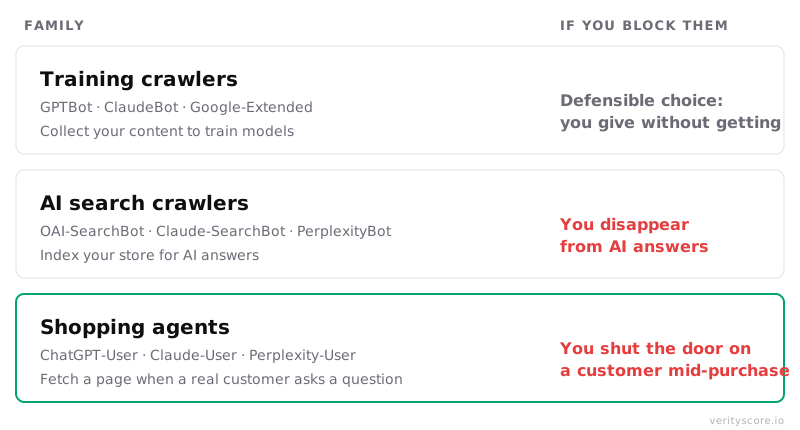
“AI bots” as a single category does not exist. There are three families, with three different business impacts. Everything else in this procedure follows from this. It is also the first building block of any GEO (Generative Engine Optimization) strategy: before optimizing your content for AI visibility, make sure the engines can simply read you.
| Family | User-agents | What they do | If you block them |
|---|---|---|---|
| Training crawlers | GPTBot, ClaudeBot, Google-Extended | Collect content to train models | Defensible choice: you give without getting |
| AI search crawlers | OAI-SearchBot, Claude-SearchBot, PerplexityBot | Index your store for ChatGPT, Claude, Perplexity answers | You disappear from those answers |
| Shopping agents | ChatGPT-User, Claude-User, Perplexity-User | Fetch a page when a real user asks a question | You shut the door on a customer mid-purchase |
Every operator documents this separation: OpenAI, Anthropic and Perplexity all state that each crawler is controlled independently: blocking GPTBot does not affect OAI-SearchBot, and vice versa. Perplexity explicitly states that PerplexityBot is not used to train models.
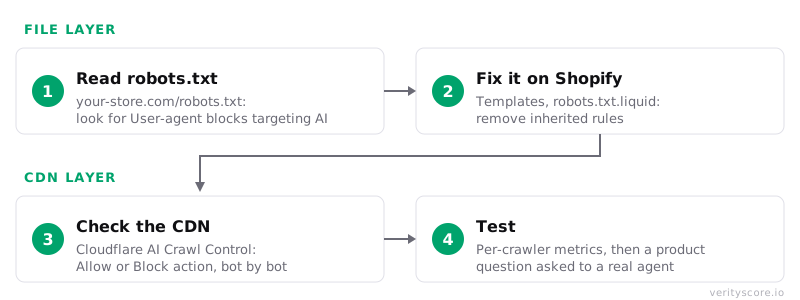
Step 1: read your robots.txt (2 minutes)
Exact path: open https://your-store.com/robots.txt in a browser.
Look for these three patterns, from most severe to most sneaky:
1. The global block:
User-agent: *
Disallow: /
The whole site is blocked for every crawler. Rare but fatal.
2. Targeted anti-AI blocks:
User-agent: GPTBot
Disallow: /

User-agent: PerplexityBot
Disallow: /
Often added in 2023-2024 following “protect your content from AI” guides, then forgotten. Check every User-agent named: if it belongs to the search or shopping-agent family (table above), the block is costing you visibility and sales.
3. Partial blocks: Disallow: /products/ or Disallow: /collections/ under an AI user-agent. More discreet, same effect on product pages.
Special case: a block wrapped in # BEGIN Cloudflare Managed content and # END Cloudflare Managed Content. Those lines do not come from your site: this is Cloudflare’s managed robots.txt, prepended to yours at the edge. Editing your origin file (Shopify or otherwise) will not remove them: the configuration lives in the Cloudflare dashboard (see step 3).
Expected result: on a Shopify store without customization, you should only see Disallow rules on /admin, /cart, /orders, /checkouts/, /account and similar. No User-agent block naming an AI crawler. If that is your case, skip straight to step 3: your robots.txt is healthy.
Step 2: fix it on Shopify (5 minutes)
Shopify blocks no AI crawler by default. If your robots.txt contains AI blocks, they come from a custom robots.txt.liquid file in your theme.
Exact path: Online Store → Themes → … button on the live theme → Edit code → Templates folder → robots.txt.liquid.
- If the file does not exist: Shopify serves its default robots.txt, which is healthy. Nothing to do.
- If the file exists: find the
User-agentblocks targeting AI crawlers and remove them. Keep therobots.default_groupsLiquid loop that generates the default rules: Shopify recommends keeping these Liquid objects, because the default rules are updated automatically.
Known limit: Shopify classifies editing robots.txt.liquid as an unsupported customization. Shopify Support will not help edit this file, and one badly written rule can cut all your traffic. If you are not comfortable, delete the whole template (your theme falls back to Shopify’s healthy default) rather than editing rule by rule.
Timeline after the fix
| Moment | What happens | What you see |
|---|---|---|
| T+0 | The new robots.txt is served immediately | your-store.com/robots.txt reflects the change on reload |
| T+0 to 24h | Each crawler re-reads the file on its next visit (most cache robots.txt up to 24h) | Nothing visible: normal propagation window |
| T+24h to a few days | AI search crawlers resume exploring the unblocked pages | Progressive reappearance in AI answers, citation never guaranteed |
Check while waiting: reload your-store.com/robots.txt in a private window to confirm the served version is the new one (not a cache).
Step 3: check the CDN layer (5 minutes)
This is the step almost everyone skips, and it is where the blocks nobody decided are hiding. A CDN can refuse a crawler before it even reaches your robots.txt: that block is invisible in the file.
Case 1: standard Shopify store. Your CDN is managed by Shopify, which does not block AI crawlers by default. If steps 1 and 2 are clean, you are done. Watch out, however, for “content protection” or anti-bot apps installed on the store: check their configuration one by one.
Case 2: site behind Cloudflare (custom site, WooCommerce, headless, or a domain proxied through Cloudflare). Since July 1, 2025, Cloudflare blocks known AI crawlers by default on new domains. If your domain was added after that date, you are probably blocking without having chosen to.
And from September 15, 2026, it expands. Cloudflare announced new defaults on July 1, 2026: on new domains, the Training AND Agent categories will be blocked by default on pages that display ads (the Agent category explicitly includes ChatGPT-User and browser-use agents, i.e. shopping agents). Search stays allowed. Existing customers must set their preferences in Security settings before September 15.
The trap you absolutely need to know: the new defaults enforce the most restrictive applicable rule. Cloudflare states it in plain words: multi-purpose crawlers such as Googlebot, Applebot and BingBot will be blocked for customers who select to block Training. In other words, ticking “block AI training” at the Cloudflare level can remove you from classic Google Search. If you block training, do it in robots.txt (Google-Extended, GPTBot), not through the Cloudflare category, as long as this behaviour is in force.
Exact path: Cloudflare dashboard → your domain → AI Crawl Control → Crawlers tab.
- Every AI crawler appears with an
Actioncolumn: selectAlloworBlockbot by bot. - Available on the Free plan (user-agent detection; paid plans add Bot Management’s advanced detection).
- Since July 1, 2026, Cloudflare also classifies verified bots by intent (
Search,Agent,Training,Transact…), which maps exactly to the three families in step 0.
Cloudflare’s managed robots.txt. If your robots.txt shows a # BEGIN Cloudflare Managed content block, the managed robots.txt feature is on. What it does, precisely: it prepends a Content-signal: search=yes, ai-train=no line and Disallow: / rules targeting eight training crawlers (GPTBot, ClaudeBot, Google-Extended, CCBot, Bytespider, Amazonbot, Applebot-Extended, meta-externalagent) to your file. It touches neither AI search crawlers nor shopping agents: that is consistent with the three-family logic, and a defensible setting if you refuse training.
Exact path to enable or disable it: Security → Bots → Configure Bot Fight Mode → Instruct bot traffic with robots.txt toggle (also reachable via Security → Settings, Bot traffic filter). Available on all plans. If the block persists after disabling, purge the Cloudflare cache for /robots.txt: the managed version can keep being served for a few minutes.
Setting consistent with the three families: allow AI search crawlers and shopping agents; decide freely on training crawlers.
Timeline after a Cloudflare change
| Moment | What happens | What you see |
|---|---|---|
| T+0 to 1 min | The rule propagates across the Cloudflare network | The Crawlers tab shows the new action |
| T+a few hours | Allowed crawlers resume visiting | The AI Crawl Control Metrics tab shows allowed requests per crawler |
Check while waiting: the AI Crawl Control Metrics tab lists recent requests per crawler, with their status. That is the direct proof: if PerplexityBot still shows Blocked after your change, the rule is wrong.
Step 4: the final test
your-store.com/robots.txt: no remaining block targeting an AI search crawler or a shopping agent.- If Cloudflare: AI Crawl Control
Metricstab showingAllowedrequests for family 2 and 3 crawlers. - Real agent-side test: ask ChatGPT (with search enabled) or Perplexity a question about one of your products, naming your brand. If your product page is accessible, the tool can fetch it live. One failed attempt proves nothing (citation depends on many other factors), but a systematic refusal to read a URL you paste is a signal of a remaining block.
Troubleshooting
- robots.txt does not change after editing the template → you edited an unpublished theme. Check you were on the live theme, or republish.
- robots.txt is clean but a crawler never shows up in logs/metrics → block at another layer: anti-bot app, WAF, server firewall. On Cloudflare, also check custom WAF rules and Bots settings beyond AI Crawl Control.
- A contractor tells you blocking all AI “protects your content” → true for a publisher that lives off its content, false for a store that lives off being found and recommended. Blocking is decided family by family, not wholesale.
Related articles
- Shopify robots.txt: useful AI bot access
- llms.txt for Shopify: a useful AI content index
- Agent Readiness Score: the 11 /.well-known/ files to publish in 2026
- The real AI traffic funnel: crawl vs click
- Customer reviews: 1 in 4 equipped stores is silent to AI - Measured across 457 French Shopify product pages
To go further than the manual check: the Verity Score audit reads your robots.txt, tests your product pages’ accessibility and verifies the signals each AI engine can actually extract. It is available in the public Shopify app: install Verity Score →